How to Redeem Rise Piece Codes
Group join, Menu button, exact paste, Redeem. The box fails on spelling and expired strings.
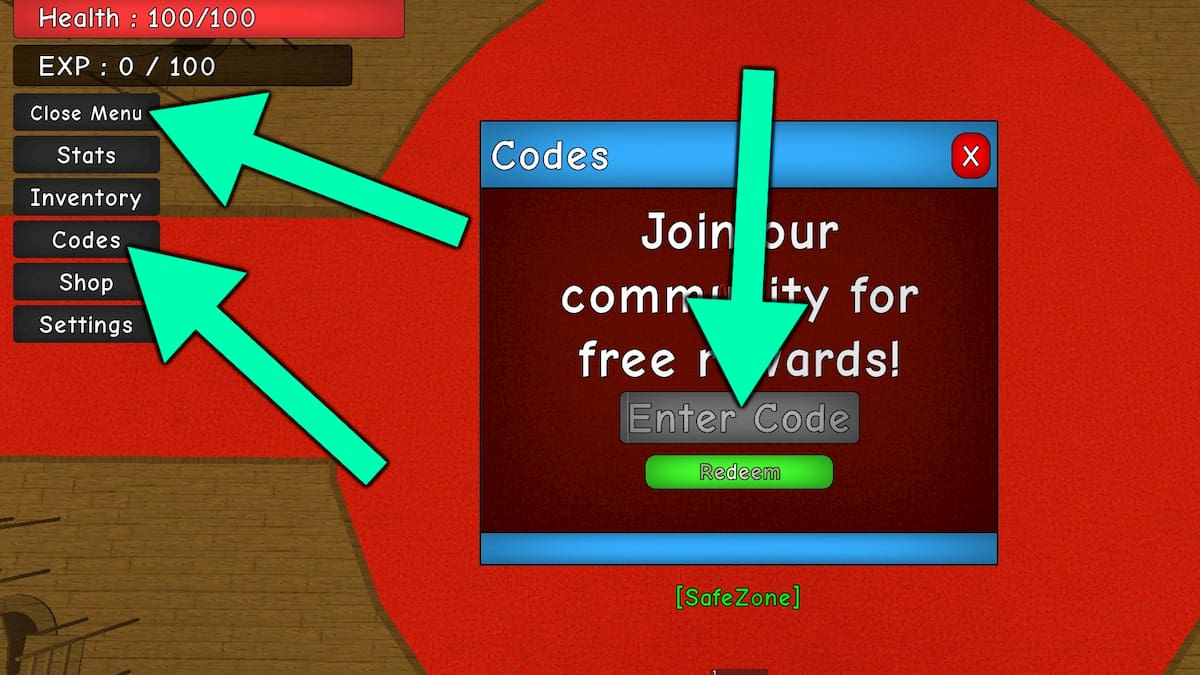
Redeeming Rise Piece codes is a six-click loop once the Rise House group is on your account. The live strings sit on the codes hub. This page is the click path: group, launch, Menu, Codes, exact type, Redeem. If you already mashed Redeem on Update5 or Release!, stop — those belong on expired codes, not in this box.
Rewards are Zeni and Trait Rerolls. Codes will not hand you Gems, a spec, or a fruit. Spend the Zeni on a katana, then take the rerolls to the Traits NPC after you read how traits work.
Join the Rise House group
Open the official Rise House community from the links hub and press Join. The group id is 868511538. Wait until Roblox shows you as a member — a pending request is not enough. Then fully leave and rejoin Rise Piece so the server reloads your groups. Staying in an old server after joining is the most common reason a correct code still errors.
You do not need Discord to redeem, but the Discord server is where Rise House posts new strings first. Bookmark it after the group join so you are not hunting screenshots later.
Launch, Menu, Codes, Redeem
- Launch Rise Piece on PC or Mobile. Console is not playable yet. Servers hold 10 players; PvP can be turned off in settings if you want a quiet claim.
- Look under the EXP bar on the left side of the HUD. Press Menu.
- Choose Codes from that menu. A text box labeled for codes appears.
- Type one live string from the working codes table. Match capitals. Do not add spaces.
- Press Redeem. Zeni and Trait Rerolls land in your currencies immediately if the string is valid and unused.
- Repeat for the remaining live codes. Each string is one-time per account.
On mobile the Menu control is the same tree, just a smaller tap. If the HUD is covered by a tutorial prompt, dismiss or finish that prompt first — the Codes entry will not sit under a blocking overlay.
Exact spelling that actually fails
Codes are case-sensitive. Update6 is not update6 or Update 6. 225kVisits keeps the capital V. 1565Likes keeps the capital L. The trap is 1550Favorits: Rise House spelled it Favorits, not Favorites. If you “fix” the English, Redeem rejects a still-live code.
The other trap is name collision. 1WeekCosmicGarou is live. The older Cosmic Garou string (space, no 1Week) expired after the Cosmic Garou update week. Paste from the codes hub, not from memory.
Punctuation on dead codes still matters for the archive: 350CCU!, Sub2KozzTark!, Sub2YahikoDoidao!, and Release! all used a trailing bang. 2,5kVisits used a comma. None of those pay now; they are listed on expired codes so you can see why a screenshot lied.
When Redeem does nothing
Work the list in order:
- Confirm the string is still on the working codes table, not the archive.
- Confirm you joined Rise House and rejoined the game afterward.
- Paste once. Hidden spaces from Discord mobile keyboards break the box — delete and type by hand if a paste fails.
- One account, one redeem. Alts need their own group join and their own claim.
- If the Menu itself is missing, you are in a loading or cutscene state. Wait until the EXP bar is visible.
- After a numbered patch such as Update 6, servers sometimes shut down for a few minutes. Relog and try again; do not assume the code died during a shutdown.
Automation is not required. Some scripts include a code-redemption toggle, but injecting an executor just to claim five strings is extra risk for a one-minute task. If you still want that toggle, read how to use scripts first.
After a successful claim
Open inventory or the currency counters and confirm Zeni and Trait Rerolls moved. Then follow getting started: buy the katana, talk to the Traits NPC, and only then start the leveling skip toward Desert, Minecraft, Jujutsu, and Hueco Mundo. Put spare points in Defense and the rest into the stat your spec uses. The stat planner keeps Melee, Sword, and Special from splitting your build.
New pirates should not sit in the Codes menu hoping for a sixth string. When Rise House ships another visit or likes code, it will appear in Discord and then on the codes hub. Until then, the five live codes are the entire gift.
Frequently Asked Questions
Quick answers to the most common Rise Piece questions.
Where is the Rise Piece Codes button?
Open **Menu** under the EXP bar on the left, then choose **Codes**. Full clicks are on this page; the live strings are on the codes hub.
Do I have to join a Roblox group?
Yes. Join Rise House (community 868511538) from the links hub, then relaunch the game so the server sees the membership.
Why does 1550Favorits fail?
The live spelling is **Favorits**, not Favorites. Codes are case-sensitive. Copy it from working codes instead of correcting the English.
Can I redeem Rise Piece codes on mobile?
Yes. PC and Mobile are live. Use the same Menu path. Console is not playable yet, so there is no console redeem flow.
The box says the code is invalid. Now what?
Check expired codes. If it is listed there, stop retrying. If it is still on the codes hub, fix the group join and paste with no extra spaces.